Free talent release form for film and video
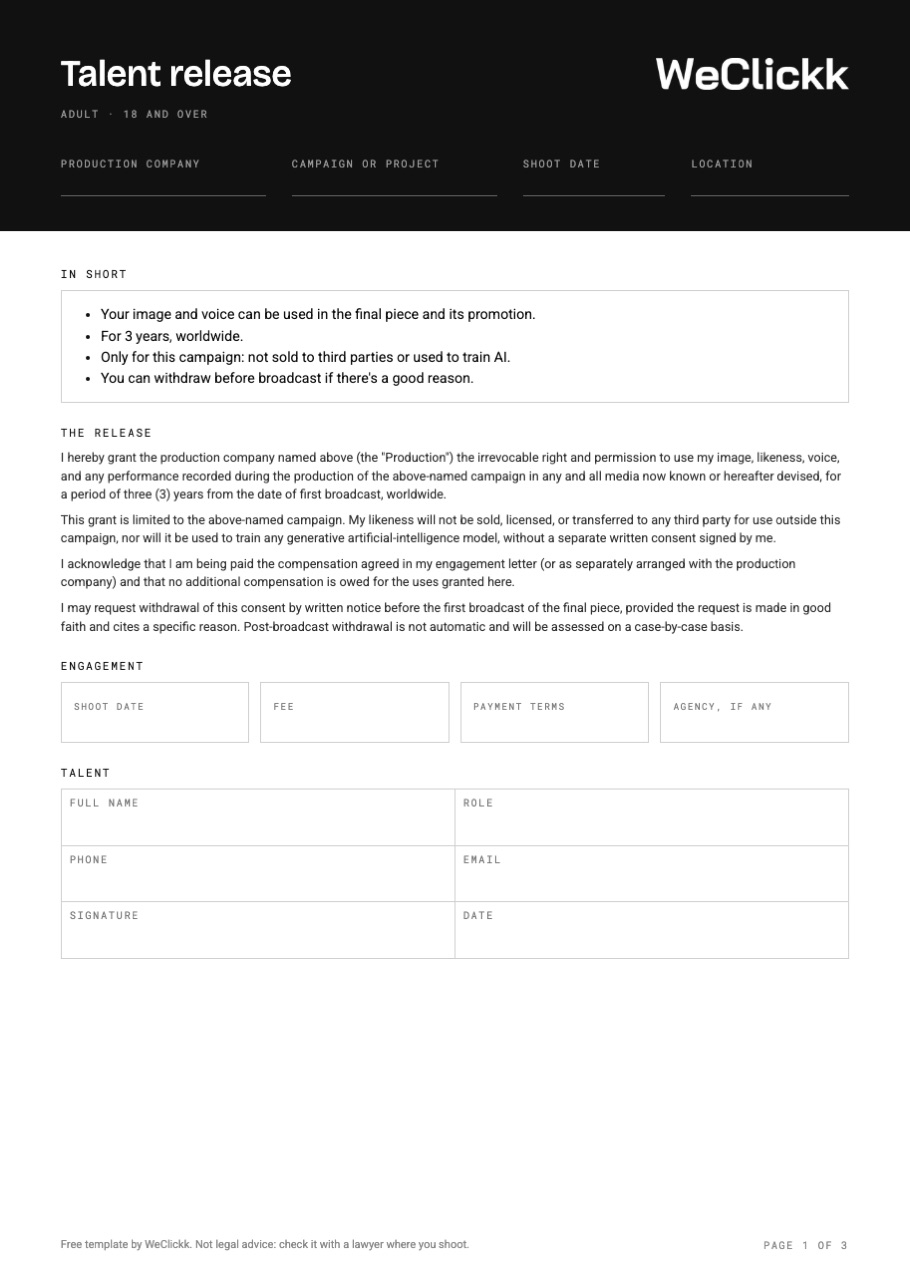
A detailed three page release with the same wording WeClickk uses: four plain points, the full legal text, engagement details, a guardian release for anyone under 18, and a record page for the production.
Free. No sign up. Works in Word, Google Docs and Pages. Not legal advice.
What goes in a talent release
A good release answers what is being used, where, for how long, and what the person gets. The template has a place for each.
The shoot
The production company, the campaign or project, the shoot date and the location. It ties the release to one piece of work.
In short
Four plain points anyone can understand before they sign: what is used, for how long, the limits and how to withdraw.
What is granted
The right to use the person's image, likeness, voice and performance, in all media, for three years, worldwide.
The limits
Only for this campaign: the likeness is not sold to third parties or used to train AI without a separate consent.
Engagement
Shoot date, fee, payment terms and the agency, if there is one.
Signer details
Full name, role, phone, email, signature and date. For a minor, the guardian's details and relationship too.
Guardian release
Page two, for anyone under 18, signed by a parent or legal guardian.
Release record
Page three, for the production: release number, how it was signed, who stored it, any withdrawal, and a checklist before take one.
How to use a talent release form
- Fill in the top before the shootAdd the production company, project, date and location before anyone signs, so talent read a finished form, not a blank one.
- Match the term to the usageIf the client buys one year in the GCC, the release should say so. Change the term and territory before you print.
- Use the guardian release for under 18sAnyone under 18 does not sign for themselves. A parent or legal guardian signs the guardian release on page two.
- Get it signed before take oneNot at wrap, when people are tired and leaving. Once the camera rolls on someone, you need their release.
- Keep every copy with the shootStore the signed forms with the project, so you can find them when the client or a broadcaster asks.
Get releases signed on set in WeClickk
Paper releases get lost in a car or a bag at wrap. In WeClickk every talent on the shoot gets a release. Show them a QR code on set and they sign on their own phone, or send them the link by email. The signed PDF stores itself on the shoot.
- Talent sign on their own phone from a QR code
- Plain points in English and Arabic, full legal text one tap away
- A guardian release for anyone under 18
- Signed PDF stored on the shoot, with a timestamp
Talent release questions
What is a talent release form?
A talent release form is the signed permission from a person on camera. It lets the production use their image, voice and performance, and says for what, where and for how long.
Who needs to sign a talent release?
Everyone who is recognisable and featured in the piece: actors, models, presenters and members of the public you feature. Rules for people in the background differ by country, so check where you shoot.
What about child actors and minors?
A person under 18 does not sign for themselves. Their parent or legal guardian signs a guardian release, which is page two of this template. The age of majority can differ by country, so check the rule where you shoot.
Do I need a talent release to film in the UAE?
UAE privacy law is strict about filming and publishing a person's image without their consent, so get a signed release from everyone you feature and keep it with the shoot. Your licensed production company or a lawyer can confirm what else your shoot needs.
Is this template legal advice?
No. It is the same wording WeClickk uses for releases by default, and a good starting point. Check it with a lawyer where you shoot before you rely on it.
Can I edit the template?
Yes. Download the Word file and open it in Word, Google Docs or Pages. Change the term, territory and wording to fit your shoot.
Get the free talent release form
Print the PDF, or edit the Word file for your next shoot.